
Gmail CRM Integration for Sales Automation
Overview
ActiveCampaign’s browser extension transforms the Gmail experience for sales and marketing professionals by integrating CRM, automation, and contact management directly into the inbox. Designed to streamline workflows, the tool enables users to manage leads, track deals, and trigger automated follow-ups without leaving their email environment. This integration is particularly valuable for teams aiming to reduce context switching and maintain real-time accuracy in customer data.
The software is tailored for sales representatives, marketers, and small business owners who rely heavily on Gmail for daily communication and customer engagement. By embedding ActiveCampaign’s CRM functionality into the email interface, the extension ensures that every interaction is logged and actionable. Users can update contact records, create new deals, and monitor automation progress while responding to messages, fostering a more organized and responsive workflow.
While the developer did not provide additional details about the company’s background, the extension’s functionality suggests a focus on productivity and automation. Real-world use cases include qualifying leads during email exchanges, initiating targeted follow-up sequences based on user behavior, and maintaining consistent pipeline updates. The tool is especially useful for remote teams and solopreneurs who need a lightweight, integrated solution for managing sales processes.
Key Features & Capabilities
- CRM Integration in Gmail – Access and update contact records, deal stages, and custom fields directly from the email interface.
- Automated Follow-Up Sequences – Trigger personalized email sequences based on user actions, such as product interest or appointment booking.
- Real-Time Contact Data Access – View social profiles, tags, custom field values, and active automation statuses beside each email.
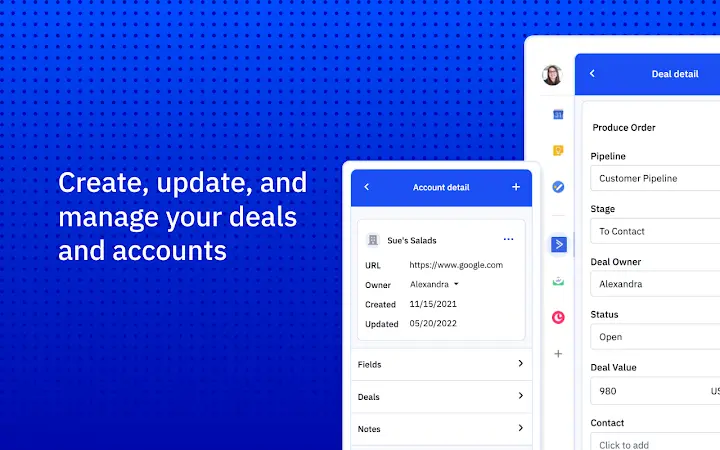
- Deal Pipeline Management – Create, update, and track deals through customizable stages without switching applications.
- Seamless Workflow Automation – Execute multi-step automation workflows directly from Gmail, reducing manual input and errors.
These features enable users to maintain a continuous flow during customer interactions. For example, when a prospect responds with interest in a product, the user can instantly assign them to a targeted follow-up sequence. Similarly, if a contact schedules a meeting, the system can automatically trigger a pre-event reminder and a post-event check-in, ensuring no follow-up is missed. The extension supports a high degree of customization, allowing users to align workflows with their specific sales or marketing processes.
User Interface, Workflow & Performance
The extension integrates directly into the Gmail interface, appearing as a sidebar panel that displays relevant contact and deal information alongside the email thread. Navigation is intuitive, with clearly labeled sections for contact details, automation status, and pipeline progress. The UI is designed to minimize clutter while maximizing accessibility to critical data.
Workflow efficiency is enhanced by the ability to perform actions—such as creating a deal or starting an automation—without navigating away from the inbox. This reduces time spent switching between applications and helps maintain focus during high-volume email periods. The developer did not specify resource usage details, but the 4.2 MB installation size suggests a lightweight footprint. Performance observations are based on general software behavior patterns, indicating smooth operation under typical usage conditions.
Stability appears to be consistent, with the extension functioning reliably during extended use. However, users should be aware that some features may not work with the newer 2018 Gmail interface, as noted in the official documentation. The extension does not appear to significantly impact browser performance based on available data.
Compatibility & System Requirements
The ActiveCampaign extension is compatible with Windows, Mac, and Linux operating systems, making it accessible to a broad range of users. It is designed to work with the Chrome browser, as it is a Chrome extension, and is optimized for classic Gmail. The installation size is 4.2 MB, which is minimal and suitable for most devices.
Exact system requirements were not listed. Compatibility information is limited to the supported platforms and browser environment. The developer did not provide details on CPU or RAM usage, nor did they specify minimum hardware specifications. Users are advised to ensure their system meets general Chrome browser requirements for optimal performance.
Pros and Cons
Pros
- Seamless integration with Gmail for uninterrupted workflow
- Real-time access to CRM data and automation status
- Lightweight at only 4.2 MB
- Free to use with no hidden costs
- Enables automation without leaving the inbox
Cons
- Some features may not function in the newer 2018 Gmail interface
- No official support for mobile browsers
- Limited system requirement details
- Dependent on ActiveCampaign’s cloud infrastructure
- May require initial setup and training for new users
FAQ Section
Is the ActiveCampaign extension free to use?
Yes, the extension is available at no cost. There are no subscription fees or hidden charges for using the core features.
Which browsers and operating systems are supported?
The extension is compatible with Windows, Mac, and Linux systems when used with the Chrome browser. It is optimized for classic Gmail.
Can I use this extension offline?
No, the extension requires an active internet connection to access ActiveCampaign’s cloud-based CRM and automation services.
How often does the extension receive updates?
Updates are released periodically by the developer to improve functionality, fix bugs, and maintain compatibility with Gmail’s evolving interface.
Is my data secure when using the extension?
Yes, the extension uses secure connections and follows ActiveCampaign’s privacy policies. Data is stored in the cloud and protected with industry-standard encryption.
Final Thoughts + CTA
ActiveCampaign’s Gmail extension delivers a powerful blend of CRM functionality and automation within a familiar email environment. Its ability to integrate contact management, deal tracking, and workflow automation directly into Gmail makes it an essential tool for sales and marketing teams seeking efficiency. While compatibility with the newer Gmail interface remains a limitation, the core functionality remains robust and reliable.
For professionals who rely on Gmail as their primary communication hub, this tool offers a significant advantage in maintaining data accuracy and reducing workflow friction. The free access model further enhances its appeal. With a lightweight design and seamless integration, it stands out as a practical solution for modern sales teams.
Download ActiveCampaign Extension for Gmail now







